
How to Automate SaaS Renewal Outreach with AI and n8n (Free Template)
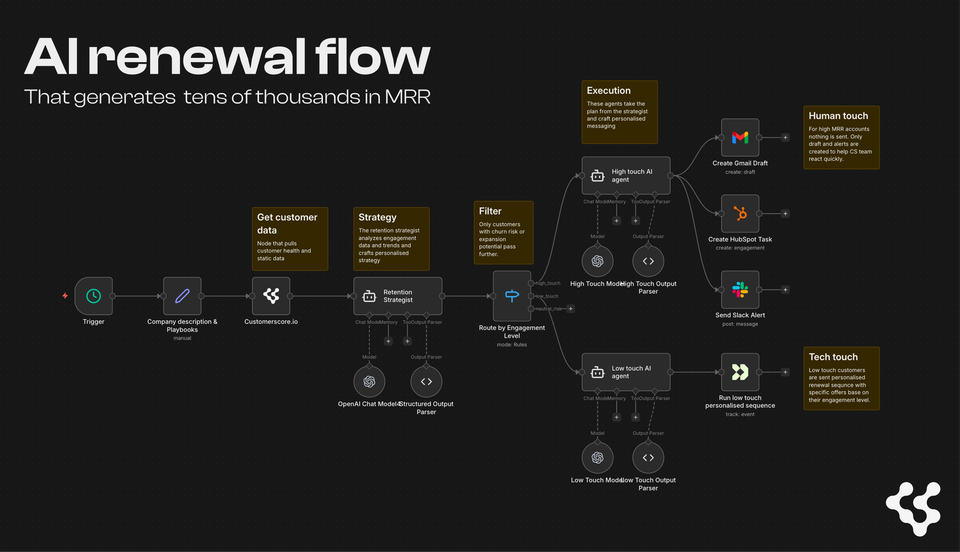
Most SaaS companies treat renewals like a calendar reminder. Here's how to build an automated, AI-driven retention system that reduces customer churn at renewal — with a free n8n workflow you can deploy today.
Renewal season at a SaaS company usually looks something like this: someone pulls a spreadsheet of upcoming renewals, a CSM sends a few check-in emails, and the rest of the customer base silently decides whether to stay or go. No analysis. No personalization. No strategy.
The problem isn't that teams don't care. It's that renewal outreach doesn't scale when you're doing it manually — especially if you have hundreds or thousands of customers and a lean team.
We built an n8n workflow that changes this. It wakes up every morning, pulls customers approaching renewal, runs AI analysis on each one, and executes a personalized customer retention strategy — automatically. High-value accounts get drafted emails, CRM tasks, and Slack alerts. Low-touch accounts get triggered into the right email campaign. No manual triage required.
This article walks you through how it works and how to set it up yourself.
What the workflow does to reduce churn rate
The automation handles the full renewal preparation cycle in four steps:
1. Pulls customers close to renewal — Every morning, the workflow fetches customers whose renewal date is approaching from your customer health platform (CustomerScore.io or your own data source).
2. Analyzes churn risk and expansion signals — An AI agent (the "Retention Strategist") ingests each customer's health data — engagement scores, usage trends, support tickets, feature adoption, seat utilization — and classifies them into segments.
3. Decides the right retention strategy — Based on the analysis, the AI determines whether the customer is a churn risk, expansion opportunity, or healthy. It assigns an urgency level (immediate, high, moderate, or low) and recommends specific next steps based on your playbooks.
4. Executes the playbook automatically — The workflow routes each customer down the right path based on the AI's assessment. No manual sorting, no spreadsheet reviews, no forgotten accounts.
Three paths for customer retention, zero manual work
High-touch path (big accounts, high risk)
For customers that need human attention — typically higher MRR accounts or those with urgent churn signals — the workflow does three things simultaneously:
- Drafts a personalized email in Gmail using your retention playbook's talking points, referencing actual customer data and usage patterns
- Creates a HubSpot task for the assigned CSM with full context: what's happening, why it matters, what to do
- Sends a Slack alert to your CS team channel with the urgency level and recommended action
The CSM doesn't have to research anything. They open Slack, see the alert, review the draft, and hit send.
Low-touch path (smaller accounts)
For lower-value accounts where 1:1 outreach isn't practical, the AI selects the optimal automated campaign in Customer.io (or your email platform) and fires an event trigger with personalization data — the customer's specific pain points, opportunities, and the right offer type.
The customer receives a tailored sequence that feels personal, even though no human wrote it for them specifically.
Neutral path (healthy customers)
Customers flagged as healthy don't get intervention in this flow. No unnecessary emails, no false alarms. The workflow only acts where action is needed.
Why this matters for your retention rate
The data behind this approach is compelling. Annual contract churn concentrates at the renewal anniversary — not mid-year. Companies that prepare for renewals 30–60 days out, armed with customer health data, convert at significantly higher rates than those who send a generic renewal reminder.
The numbers that make renewal automation worth the setup time:
- Roughly 70–80% of customers who eventually churn show clear behavioral warning signs more than 30 days before they cancel
- 97% of churning customers leave silently — they never contact support
- Companies with net revenue retention (NRR) above 110% grow at double the rate of companies below 100%
- Annual subscribers churn at 3–5× lower rates than monthly subscribers — making the renewal conversation the highest-stakes moment of the year for annual accounts
This workflow turns the renewal window from a risk event into a structured process — catching at-risk accounts before the conversation, not after.
What you need to set it up
The workflow runs on n8n (open-source, self-hostable) and connects to:
- CustomerScore.io (or your own customer health scoring data source) — for engagement scores, usage data, and churn risk signals
- OpenAI API — powers the three AI agents (strategist, high-touch writer, low-touch router)
- Gmail — for email draft creation
- HubSpot — for CRM task creation
- Slack — for team alerts
- Customer.io — for automated campaign triggers
You can swap out any of these for equivalents in your stack. The logic stays the same.
Setup in 5 steps
Step 1: Import the template
Download the JSON file from our template page and import it into n8n via + → Import from File. All nodes come pre-configured.
Step 2: Connect your customer data source
If you're a CustomerScore.io customer, reach out and we'll help you connect the data endpoint. If you're using a different platform, you can combine data from sources like Mixpanel + Stripe — though you'll need to handle the data mapping yourself. CustomerScore does the heavy lifting here by unifying billing, product usage, and CRM data into a single health profile per customer.
Step 3: Add your credentials
Update API keys across the workflow:
- OpenAI API (3 nodes: Retention Strategist, High-Touch Agent, Low-Touch Agent)
- Gmail (1 node)
- HubSpot (1 node)
- Slack (1 node — also update the channel ID to your CS team's channel)
- Customer.io (2 nodes)
Step 4: Customize your playbooks
This is the most important step. The workflow includes a "Company description & Playbooks" node where you define:
- Your product context — what your product does, what your metrics mean, what "healthy" vs. "at-risk" looks like for your specific business
- Your retention playbooks — churn intervention strategies, expansion tactics with pricing tiers, and the talking points your CSMs actually use
The AI agents reference these playbooks when drafting emails and selecting campaigns. Your real company language is what makes the outreach feel authentic instead of generic.
Step 5: Test and schedule
Run the workflow manually first with a single customer to verify each step fires correctly: strategy classification, email drafts, HubSpot tasks, Slack alerts, Customer.io events.
Once it's working, add a Schedule Trigger and start with a small batch (10 customers per run). Scale up to 50–100 once you're confident in the output quality.
Pro tip for managing customer churn at scale: Set up separate schedules by segment — run daily for accounts above $5K MRR or within 14 days of renewal, twice weekly for standard accounts, and weekly for lower-value customers.
Customization ideas
Adjust MRR thresholds — The default high-touch cutoff is $1,500 MRR. Change this in the Retention Strategist's system prompt to match your business.
Add more channels — Want SMS alerts? Add a Twilio node parallel to the Gmail/HubSpot/Slack outputs. Want a Notion database for CSM review? Add a Notion node after the strategist.
Add human-in-the-loop approval — For critical accounts, insert a Wait node after the AI agent that sends an approval request via Slack or email. The CSM reviews and approves before anything goes out.
Get the template
Download the n8n workflow JSON GitHub: template page →
Not using n8n? No problem.
We offer done-for-you implementation of this entire retention automation — custom playbook development, customer health scoring configuration, campaign design, workflow setup, and 30-day optimization.
Book a call → or email us at patrik@customerscore.io
Not scoring customer health yet?
This workflow is powered by customer health data. CustomerScore.io uses machine learning to score your customers' churn risk and expansion signals — connecting your billing, product analytics, and CRM data into actionable health scores that power automations like this one.