
Webhooks
Webhooks allow you to receive real-time notifications about events that occur in your Customerscore.io account. When an event happens, Customerscore.io sends an HTTP POST request to the webhook endpoint you configure, enabling your application to respond immediately without polling.
Creating a Webhook
- Navigate to Settings → Webhooks in your Customerscore.io dashboard
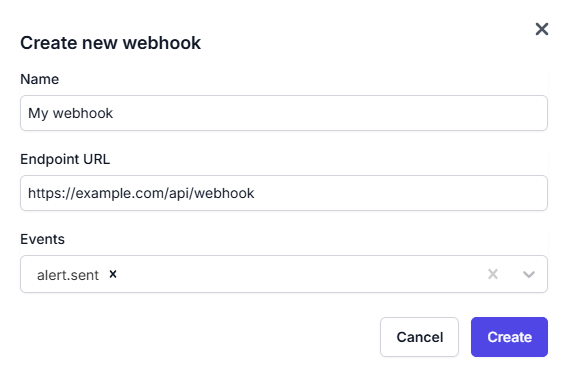
- Click Create new webhook
- Fill in the required fields:
- Name: A descriptive name for your webhook
- Endpoint URL: The HTTPS URL where webhook events will be delivered
- Events: Select the events you want to subscribe to
- Click Create
After the webhook is created, Customerscore.io generates a secret key for this webhook. This secret key is required to validate webhook signatures and confirm that incoming requests are genuinely sent by Customerscore.io.
⚠️ Important: Save your webhook secret key securely. You will not be able to view it again.
Webhook Request Details
- Method:
POST - Content-Type:
application/json - Timeout Requirement: Respond within 10 seconds
Headers
Content-Type: application/json
X-customerscore-HMAC: sha256={signature}
Verifying Webhook Signatures
To ensure webhook requests are genuinely sent by Customerscore.io, each request is signed using an HMAC SHA-256 signature.
Signature Header
The signature is included in the X-customerscore-HMAC header in the following format:
X-customerscore-HMAC: sha256={signature}
Verification Process
- Read the raw request body (not the parsed JSON)
- Generate an HMAC SHA-256 hash using your webhook secret
- Compare the generated signature with the one provided in the header using a timing-safe comparison
Verification Example (Node.js)
const crypto = require('crypto');
const express = require('express');

const app = express();

// Important: Use raw body for signature verification
app.post('/webhook', express.raw({ type: 'application/json' }), (req, res) => {
  const signature = req.headers['x-customerscore-hmac'];
  const secret = process.env.WEBHOOK_SECRET; // Your webhook secret key

  if (!signature) {
    return res.status(401).send('Missing signature');
  }

  // Get raw body buffer
  const rawBody = req.body;

  // Calculate expected signature
  const expectedSignature = crypto
    .createHmac('sha256', secret)
    .update(rawBody)
    .digest('hex');

  // Extract signature from header (remove 'sha256=' prefix)
  const providedSignature = signature.replace('sha256=', '');

  // Use timing-safe comparison to prevent timing attacks
  const isValid =
    expectedSignature.length === providedSignature.length &&
    crypto.timingSafeEqual(
      Buffer.from(expectedSignature, 'hex'),
      Buffer.from(providedSignature, 'hex')
    );

  if (!isValid) {
    return res.status(401).send('Invalid signature');
  }

  // Signature is valid, process the webhook
  const payload = JSON.parse(rawBody.toString('utf8'));

  console.log('Received webhook:', payload.event);
  console.log('Data:', payload.data);

  // Process the webhook event
  // ...

  res.status(200).json({ success: true });
});

app.listen(3000);
Best Practices
Security
- Always verify signatures: Never process webhook requests without verifying the HMAC signature
- Use HTTPS endpoints only
- Store webhook secrets in environment variables, never in source code
- Use timing-safe comparisons to prevent timing attacks
Reliability
- Respond quickly: Return a 2xx status code within 10 seconds
- Process asynchronously: Queue webhook processing for long-running tasks
- Handle retries: Be prepared to receive duplicate events
- Log everything: Keep detailed logs for debugging
Testing Your Webhook
You can test your webhook endpoint directly from the dashboard:
- Go to Settings → Webhooks
- Click the ⋮ menu on your webhook
- Select "Send test event"
- Review the response from your endpoint
The test will send a sample payload to your endpoint and display the response, making it easy to verify your integration is working correctly.
Troubleshooting (common issues)
Webhook not receiving events
- Verify your endpoint URL is publicly accessible
- Check that you're subscribed to the correct events
- Ensure your endpoint returns a 2xx status code
Signature verification failing
- Verify you're using the correct secret key
- Ensure you're using the raw request body for verification
- Check that you're removing the
sha256=prefix from the header
Timeout errors
- Respond within 10 seconds
- Move long-running tasks to background jobs
- Use async processing for webhook handling
Available Events
alert.sent
Triggered when an alert is processed and sent to the configured recipients.
Alerts are processed in batches of 1,000 customers. If an alert affects more than 1,000 customers, additional webhook events will be sent for each batch. Each payload includes batch metadata so you can track progress.
Example payload
{
  "event": "alert.sent",
  "timestamp": "2025-12-22T11:27:57.999Z",
  "data": {
    "date": "2025-12-31",
    "previous_date": "2025-12-30",
    "alert": {
      "name": "Test Alert - High Risk Customers",
      "description": "Alert triggered when customers score below 40",
      "emails": ["test@example.com"],
      "alert_condition": {
        "type": "treshold",
        "filter_by_type": "scoring",
        "filter_by": "engagementscore",
        "operator": "lt",
        "value": "40"
      },
      "segment": {
        "name": "Enterprise Customers"
      }
    },
    "customers": [
      {
        "name": "Acme Corp",
        "external_id": "acme-001",
        "current_value": 35,
        "previous_value": 45,
        "difference_abs": -10,
        "difference_pct": -0.22
      },
      {
        "name": "Beta Industries",
        "external_id": "beta-002",
        "current_value": 28,
        "previous_value": 42,
        "difference_abs": -14,
        "difference_pct": -0.33
      }
    ],
    "batch": {
      "current_batch": 1,
      "total_batches": 1,
      "total_customers": 2,
      "batch_size": 2
    }
  }
}